
Voice AI in business systems: how a voice agent integrates with CRM and ERP
 Damian Chojna April 10, 2026
 You're reading:
Voice AI in business systems: how a voice agent integrates with CRM and ERP
-
How does an AI voice agent work?
- Use cases of a voice agent in CRM and operational work
-
Prompt engineering in voice agents — the key to reliable performance
Imagine you’re driving to a client meeting. Or you’re out in the field — on a production floor, in a warehouse, out in the open. You don’t have a laptop in front of you. You’re not clicking through a system or filling in forms. And yet you can still check your meetings, add a note to the CRM, save a task, or create a new activity — simply by speaking.
This isn’t a futuristic vision — it’s a very concrete direction in the evolution of how we interact with business systems.
More and more often, instead of yet another interface, we get… a conversation.
More precisely: a voice agent that understands the user’s intent and can perform real actions in systems such as CRM.
From a field problem to a voice agent in CRM
The origins of this type of solution are highly pragmatic. In one of our projects, the starting point was a client whose employees spent most of their time outside the office — on the road, with customers, out in the field. They weren’t sitting at a computer with the CRM open, yet they still needed to:
• take notes from meetings,
• check scheduled visits,
• create tasks and follow‑ups,
• update sales data.
In such conditions, a classic interface simply stops being convenient.
How does an AI voice agent work?
At the heart of the solution is an agent — an application that acts as an intermediary between the user and business systems. The user communicates with it through a simple web application, and the agent:
- captures the user’s voice,
- understands the intent of the utterance,
- decides which tool (that is, which API) should be called,
- performs the action in the system (e.g. CRM),
- responds to the user with voice feedback.
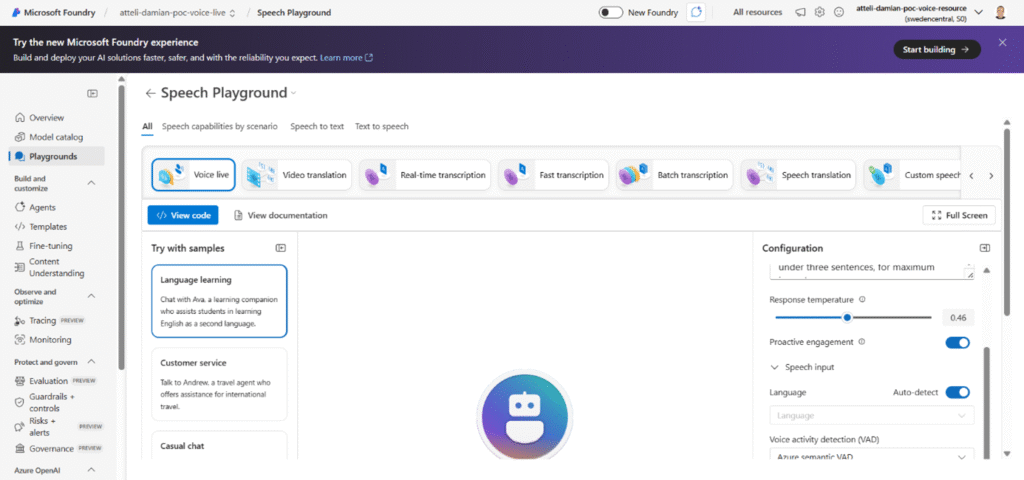
A key role here is played by the Azure Voice Live service. Instead of building a complex chain:
speech → text → language model → text → speech — we get a single, unified endpoint that handles the entire process in real time.
For the integrator, this is a major simplification. There’s no need to worry about synchronizing steps or dealing with latency — the conversation with the agent feels natural. You can even interrupt it mid‑sentence, and it will “understand.”
An agent that acts on your behalf (and only within your scope)
A very important aspect, often overlooked in marketing descriptions: security and user context.
The agent doesn’t have magical access to the entire system. It acts on behalf of a specific user and only within that user’s permissions. If the user doesn’t have access to certain information in the CRM, the agent won’t see it either. If the user isn’t allowed to create or edit something, the agent won’t do that.
From an organizational perspective, this is crucial: a voice conversation doesn’t bypass security mechanisms – it uses them.
CRM is just the beginning
When an agent is integrated with CRM, you can use voice to:
• find meetings scheduled for today or tomorrow,
• add a note to a meeting,
• link a note to an opportunity or a quote,
• create a new task,
• schedule a follow‑up meeting.
But this isn’t a technological limitation.
Any API you have access to can become a “tool” for the agent. CRM, ERP, internal systems, industry‑specific applications — it all depends on what gets connected.
We prepared a short demo of a voice agent, showcasing, among other things, a user’s conversation with the system and the execution of real operations in CRM. The demo is not a production‑ready solution, but it clearly illustrates the capabilities of the technology and how the agent interprets user intent and triggers specific actions in the system.
Use cases of a voice agent in CRM and operational work
1. A voice agent for sales teams and field work
This is one of the most obvious — but also one of the most valuable — scenarios.
A sales rep:
• is driving between meetings,
• has just left a client meeting,
• doesn’t want to (or can’t) open a laptop right away.
Instead of postponing everything “for later,” they can simply say:
“Add a note to today’s meeting with Company X: the client is interested in the offer, we’ll get back with a price quote next week.”
The agent:
• saves the note in the CRM,
• links it to the appropriate contact or opportunity,
• confirms the action verbally.
The result? Data is entered into the system immediately — fresh and complete — without the need for manual catch‑up after hours.
2. Voice notes, tasks, and quick CRM queries
A voice agent also works great as an information access layer — not just for executing actions.
Example questions:
• “What meetings do I have today after 3:00 PM?”
• “When is my next meeting with Client Y?”
• “Do I have any open tasks related to Offer Z?”
In many cases, the user doesn’t need a full CRM view — just one specific answer, and voice is the fastest way to get it.
3. Working outside the office — warehouse, service, production
Examples:
• a warehouse worker checks an order status,
• a field service technician dictates a report after completing a job,
4. An AI agent as a universal interface to multiple systems
Not every user feels comfortable with complex business systems. For some people, the barrier isn’t a lack of functionality, but the way they interact with the system.
A voice agent:
• lowers the entry barrier to the system,
• lets users “say what they want to do” instead of searching for the right screen,
• can guide users step by step.
Voice is increasingly being used at the desk as well — as an alternative to typing.
Some people prefer to dictate a note, others control an agent “in the background” while performing other tasks in parallel. This is a completely new way of working with business systems.
Prompt engineering in voice agents — the key to reliable performance
Paradoxically, the biggest challenge isn’t the integration — it’s good instructions for the agent. In other words: prompt engineering.
You need to clearly define:
• how the agent should interpret commands,
• when it should use which tools,
• how it should respond to ambiguous utterances,
• how to handle time, time zones, and conversational context.
On top of that, there are parameters such as:
Response temperature: precision vs. naturalness
In the agent configuration, an important parameter is the so‑called temperature:
• low temperature → more repetitive, predictable, “system‑like” responses,
• higher temperature → more linguistic variation and a more natural conversation.
It’s always a trade‑off:
• for operational tasks (CRM, data, dates), a low temperature usually works best,
• for more informational or supportive conversations, you can allow yourself more flexibility.
Too high a temperature increases the risk of hallucinations, while too low a temperature makes the agent sound “robotic.”
Speech detection and interruption handling
Voice Live supports mechanisms for:
• detecting when the user has finished speaking,
• responding to user interruptions while the agent is speaking,
• smooth, dialog‑based interaction.
As a result, the conversation doesn’t feel like recording commands — it feels like a real exchange of dialogue.
Speech synthesis and the Polish language
Not all available voices handle the Polish language equally well. In practice:
• a conscious choice of the voice model is essential,
• some voices “read Polish with an English accent,”
• the quality of speech synthesis has a huge impact on how the entire solution is perceived.
It’s a technical detail that directly translates into the user experience.
What's next?
Not every company needs a voice agent — but wherever users are on the move, work outside the office, or struggle with an overload of interfaces, voice can be a game‑changing improvement in quality.
If you’re wondering whether this solution fits your processes, contact us. We’ll show you a demo, talk openly about the limitations, and help you assess whether voice AI makes sense in your case.